You can connect Speicher to ChatGPT as a custom MCP server. ChatGPT can then search and read your documentation in a chat, with exactly the access you have yourself.
1. Add the MCP server
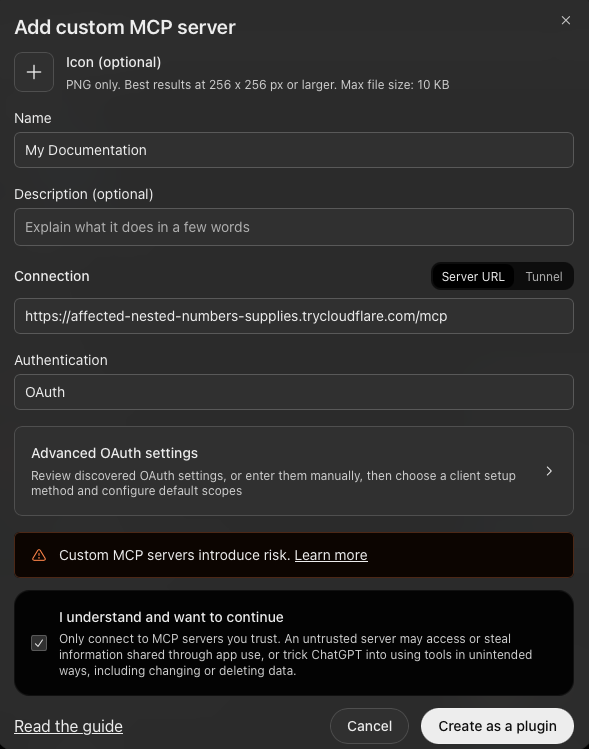
In ChatGPT on the web, open Plugins, select the plus button and choose Add custom MCP server.
- Name: give the MCP server a descriptive name (e.g.
Company Docs). - Description: optional, but we recommend to fill it because ChatGPT uses it to determine when to use the MCP Server (e.g.
Our internal documentation: handbook, specifications and guides.). - Connection: keep Server URL selected and enter your Speicher address followed by
/mcpor/mcp-public:
https://<hostname>/mcp
https://<hostname>/mcp-public
- Authentication: leave it on OAuth. You do not need the Advanced OAuth settings.
Tick I understand and want to continue and click Create as a plugin.
2. Sign in and connect
ChatGPT first asks you to confirm the connection. Click the Connect button in that dialog.
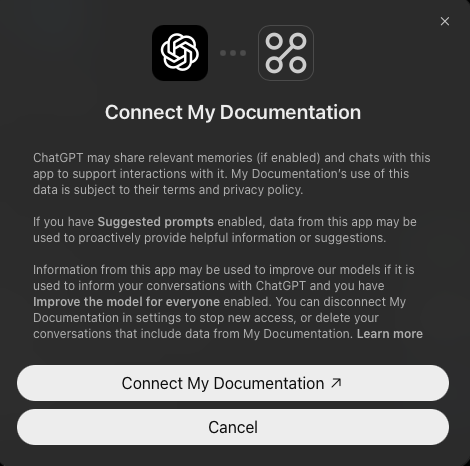
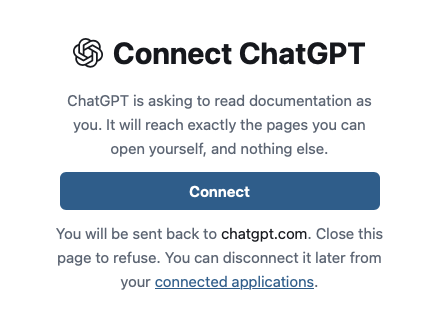
ChatGPT then opens Speicher to authorize the connection:
- Sign in to Speicher as usual.
- Speicher shows Connect ChatGPT. Click Connect.
- You are sent back to ChatGPT. The server is now connected.
3. Use it in a chat
Type @ in the message box and select the server, then ask about your documentation, for example:
- "Search our docs for how to request a new laptop."
- "Read the onboarding page in the handbook and summarise the first week."
- "Which repositories in our docs talk about deployments?"
Disconnecting
You can end the connection from either side:
- In Speicher: open Connected applications (
/-/connections) and click Disconnect next to ChatGPT. ChatGPT asks you to connect again the next time it needs the documentation. - In ChatGPT: disconnect the server in ChatGPT's settings.
Troubleshooting
ChatGPT asks you to connect again every day. Your identity provider has no directory lookup, so connections end after the session lifetime. See How long a connection lasts.
ChatGPT cannot find a page you can open in the browser. Make sure you signed in with the same account in step 2. ChatGPT only sees what that account can see.